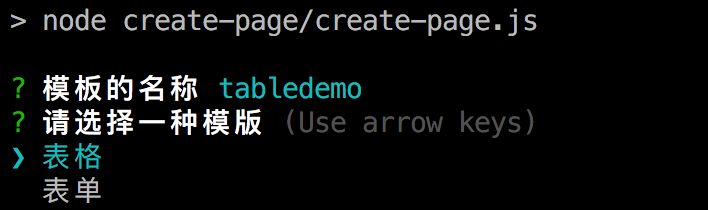
Appearance
node自动化新建页面
每一次都需要需要写vue的大致构造,我觉得还是比较麻烦的一件事。一般性可以使用vscode新建,但是我认为node更加方便
1 配置属于你的模板
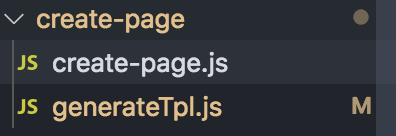
generateTpl.js
安装个人习惯可以写多个模板这里,我们只演示一种
javascript
exports.table = function(pageName) {

var tpl = `<template>
  <basic-container>
    <h3>${pageName}-page</h3>
  </basic-container>
</template>

<script>

export default {
  data() {
    return {

    };
  },
  methods: {
  }
};
</script>

<style scoped>
</style>
`
return tpl;
}
1
2
3
4
5
6
7
8
9
10
11
12
13
14
15
16
17
18
19
20
21
22
23
24
25
26
2
3
4
5
6
7
8
9
10
11
12
13
14
15
16
17
18
19
20
21
22
23
24
25
26
2 安装 inquirer
npm install inquirer --save-dev
3 创建自动化新建脚本
javascript
var path = require('path');
var fs = require('fs');
var generateTpl = require('./generateTpl');
var inquirer = require('inquirer')

const createPage = {
    template: "table",
    init: function() {
        const promptName = [{
            type: 'input',
            message: '模板的名称',
            name: 'templateName',
            filter: function (val) {
                return val.toLowerCase()
            }
        }]
        const promptList = [{
            type: 'list',
            message: '请选择一种模版',
            name: 'template',
            choices: ['表格', '表单'],
            filter: function (val) {
                return val.toLowerCase()
            }
        }]

        inquirer.prompt(promptName).then(name => {
            inquirer.prompt(promptList).then(anwsers => {
                this.initParams(name.templateName);
                if (anwsers.template==='表格') {
                    this.template = "table"
                }else{
                    this.template = "form"
                }
                this.getAllPage();
                this.generatePage();
            })
        })
    },
    initParams: function (templateName) {

        this.pageName = templateName;

        this.pageDir = path.join(__dirname, '../src/views');

        this.allPages = ""

    },
    getAllPage: function() {

        this.allPages = fs.readdirSync(this.pageDir);

    },
    generatePage: function(){

        if(this.allPages.indexOf(this.pageName) == -1) {

            this.toGenerageDir();
        } else {

            console.error('当前页面已经存在了');
        }
    },
    toGenerageDir: function(){

        try{

            fs.mkdir(path.join(this.pageDir, this.pageName), function(err){

                if(err){

                    console.error(err);
                    return;
                }

                this.toGenerateFiles();

                console.log('页面创建完成');

            }.bind(this));
        }catch(e){

            console.error(e);
        }
    },
    toGenerateFiles: function() {

        // 选择模板
        var vueFile = path.join(this.pageDir, this.pageName, `index.vue`);
        var imageDir = path.join(this.pageDir, this.pageName, 'images')

        // 创建文件
        fs.writeFileSync(vueFile, generateTpl[this.template](this.pageName));
        fs.mkdirSync(imageDir)
    }
}

createPage.init();
1
2
3
4
5
6
7
8
9
10
11
12
13
14
15
16
17
18
19
20
21
22
23
24
25
26
27
28
29
30
31
32
33
34
35
36
37
38
39
40
41
42
43
44
45
46
47
48
49
50
51
52
53
54
55
56
57
58
59
60
61
62
63
64
65
66
67
68
69
70
71
72
73
74
75
76
77
78
79
80
81
82
83
84
85
86
87
88
89
90
91
92
93
94
95
96
97
98
2
3
4
5
6
7
8
9
10
11
12
13
14
15
16
17
18
19
20
21
22
23
24
25
26
27
28
29
30
31
32
33
34
35
36
37
38
39
40
41
42
43
44
45
46
47
48
49
50
51
52
53
54
55
56
57
58
59
60
61
62
63
64
65
66
67
68
69
70
71
72
73
74
75
76
77
78
79
80
81
82
83
84
85
86
87
88
89
90
91
92
93
94
95
96
97
98
3 添加指令
在 package.json 中添加指令
javascript
"create-page": "node create-page/create-page.js",
1
4 使用指令
shell
npm run create-page
1