Appearance
生命周期
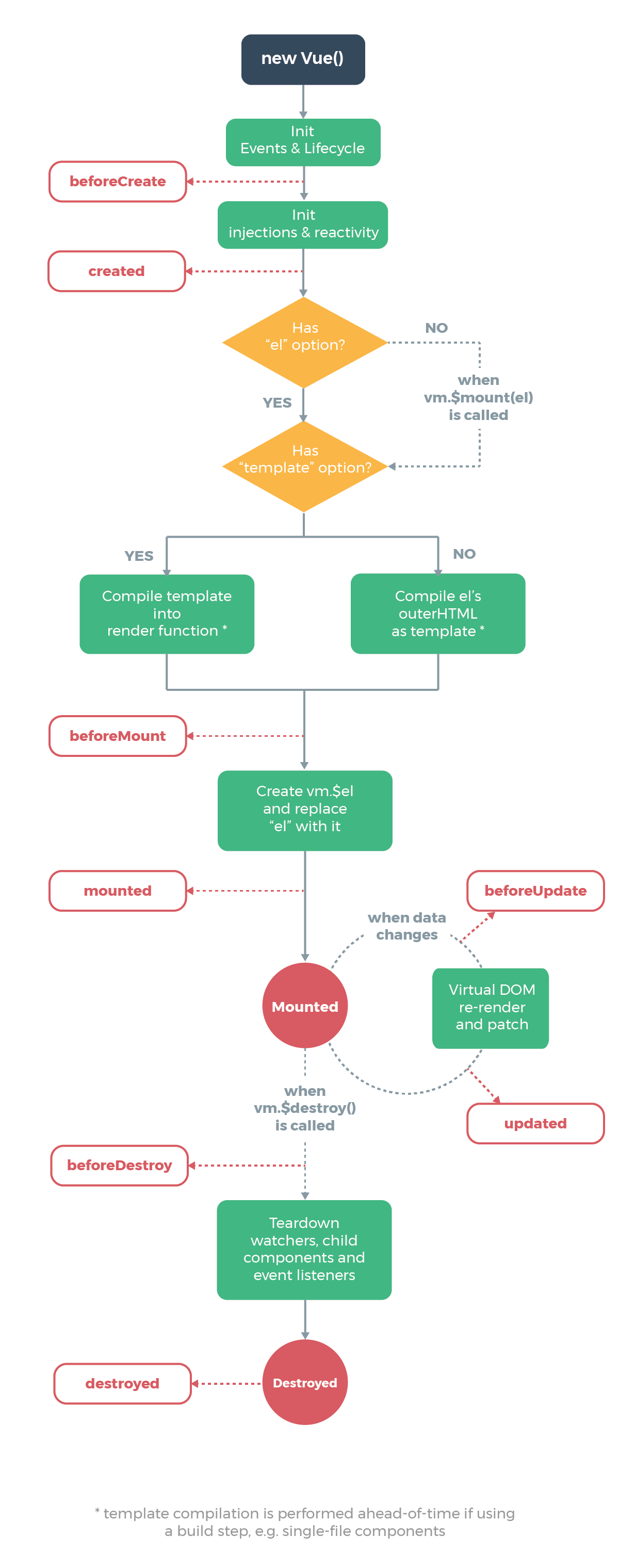
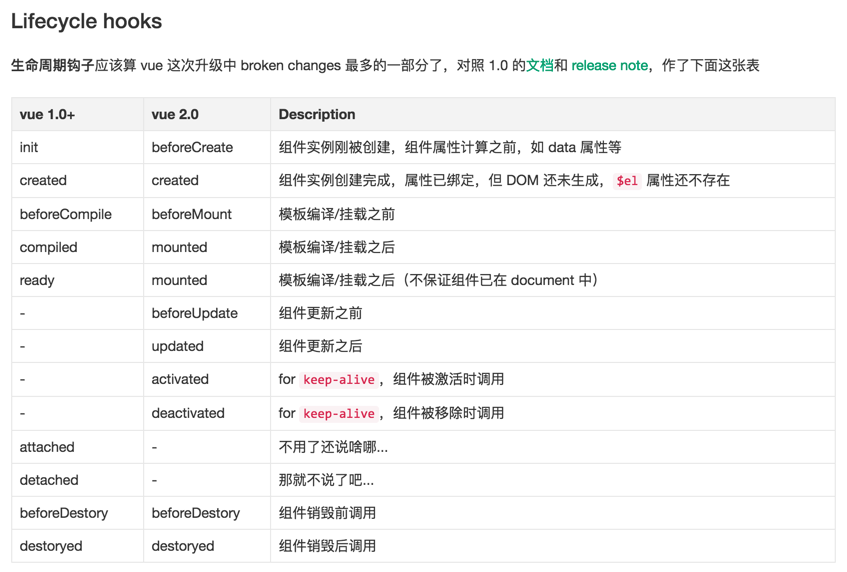
vue生命周期简介
生命周期探究
html
<!DOCTYPE html>
<html>
<head>
    <meta charset="utf-8" />
    <title>vue</title>
</head>
<body>
    <div id="app">{{message}}</div>
</body>
<script src="https://cdn.jsdelivr.net/npm/vue"></script>
<script>
    var app = new Vue({
        el: '#app',
        data: {
            message: "hello is world"
        },
        beforeCreate() {
            console.group('beforeCreate 创建前状态===============》');
            console.log("%c%s", "color:red", "el     : " + this.$el); //undefined
            console.log("%c%s", "color:red", "data   : " + this.$data); //undefined
            console.log("%c%s", "color:red", "message: " + this.message)
        },
        created() {
            console.group('created 创建完毕状态===============》');
            console.log("%c%s", "color:red", "el     : " + this.$el); //undefined
            console.log("%c%s", "color:red", "data   : " + this.$data); //已被初始化
            console.log("%c%s", "color:red", "message: " + this.message); //已被初始化
        },
        beforeMount() {
            console.group('beforeMount 挂载前状态===============》');
            console.log("%c%s", "color:red", "el     : " + (this.$el)); //已被初始化
            console.log(this.$el);
            console.log("%c%s", "color:red", "data   : " + this.$data); //已被初始化
            console.log("%c%s", "color:red", "message: " + this.message); //已被初始化
        },
        mounted() {
            console.group('mounted 挂载结束状态===============》');
            console.log("%c%s", "color:red", "el     : " + this.$el); //已被初始化
            console.log(this.$el);
            console.log("%c%s", "color:red", "data   : " + this.$data); //已被初始化
            console.log("%c%s", "color:red", "message: " + this.message); //已被初始化
        },
        beforeUpdate() {
            console.group('beforeUpdate 更新前状态===============》');
            console.log("%c%s", "color:red", "el     : " + this.$el);
            console.log(this.$el);
            console.log("%c%s", "color:red", "data   : " + this.$data);
            console.log("%c%s", "color:red", "message: " + this.message);
        },
        updated() {
            console.group('updated 更新完成状态===============》');
            console.log("%c%s", "color:red", "el     : " + this.$el);
            console.log(this.$el);
            console.log("%c%s", "color:red", "data   : " + this.$data);
            console.log("%c%s", "color:red", "message: " + this.message);
        },
        beforeDestroy() {
            console.group('beforeDestroy 销毁前状态===============》');
            console.log("%c%s", "color:red", "el     : " + this.$el);
            console.log(this.$el);
            console.log("%c%s", "color:red", "data   : " + this.$data);
            console.log("%c%s", "color:red", "message: " + this.message);
        },
        destroyed() {
            console.group('destroyed 销毁完成状态===============》');
            console.log("%c%s", "color:red", "el     : " + this.$el);
            console.log(this.$el);
            console.log("%c%s", "color:red", "data   : " + this.$data);
            console.log("%c%s", "color:red", "message: " + this.message)
        }
    })
</script>
</html>
1
2
3
4
5
6
7
8
9
10
11
12
13
14
15
16
17
18
19
20
21
22
23
24
25
26
27
28
29
30
31
32
33
34
35
36
37
38
39
40
41
42
43
44
45
46
47
48
49
50
51
52
53
54
55
56
57
58
59
60
61
62
63
64
65
66
67
68
69
70
71
72
73
2
3
4
5
6
7
8
9
10
11
12
13
14
15
16
17
18
19
20
21
22
23
24
25
26
27
28
29
30
31
32
33
34
35
36
37
38
39
40
41
42
43
44
45
46
47
48
49
50
51
52
53
54
55
56
57
58
59
60
61
62
63
64
65
66
67
68
69
70
71
72
73
chrome浏览器里打开,F12看console就能发现

beforecreated
el 和 data 并未初始化
created
完成了 data 数据的初始化,el没有
beforeMount
完成了 el 和 data 初始化
mounted
完成挂载
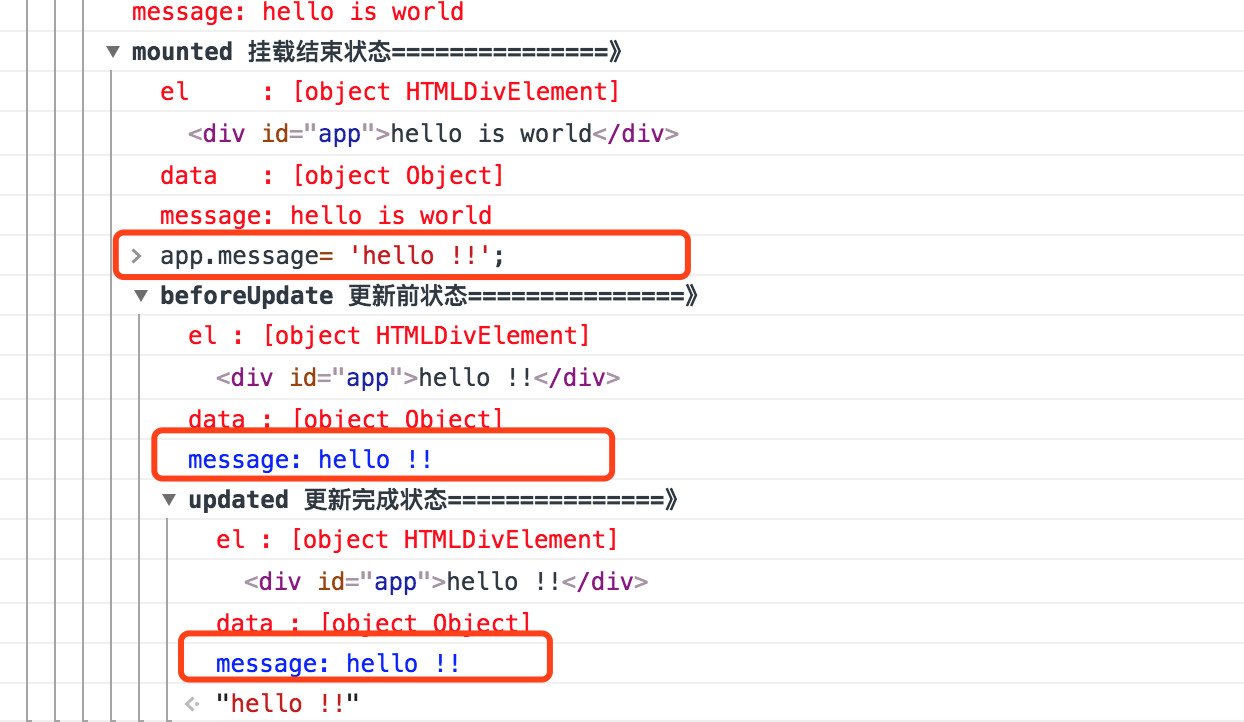
update
在console控制台中输入
javascript
app.message= 'hello!!';
1
destroy
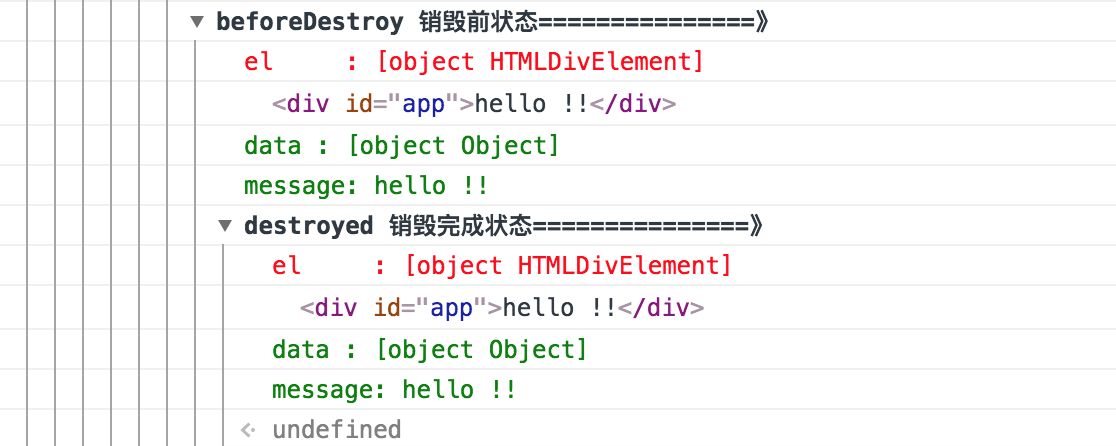
我们在console里执行下命令对 vue实例进行销毁。销毁完成后,我们再重新改变message的值,vue不再对此动作进行响应了。但是原先生成的dom元素还存在,可以这么理解,执行了destroy操作,后续就不再受vue控制了。
javascript
app.$destroy();
1
生命周期总结
beforecreate
可以在这加个loading事件,加载的动画
created
在这结束loading,还做一些初始化,实现函数自执行
mounted
在这发起后端请求,拿回数据,配合路由钩子做一些事情
beforeDestroy
你确认删除XX吗? destroyed :当前组件已被删除,清空相关内容
要掌握每一个生命周期什么时候被调用?
- beforeCreate 在实例初始化之后,数据观测(data observer)之前被调用
- created实例已经创建完成之后被调用,在这一步,实例已完成以下配置:数据观察(data observer),属性和方法的运算,watch/event事件回调.这里没有$el
- beforeMount在挂载开始之前被调用:相关的render函数首次被调用。
- mouted el 被新创建的vm.$el替换,并挂载在实例上去之后调用该钩子
- beforeUpdate数据更新时调用,发生虚拟dom重新渲染和打补丁之前。
- updated由于数据更新导致虚拟DOM重新渲染和打补丁,在这之后会调用该钩子。
- beforeDestroy实例销毁之前调用。在这一步,实例仍然完全可用。
- destroyed vue实例销毁后调用。调用后,Vue实例指示的所有东西都会解绑定,所有的事件监听器会被移除,所有的子实例也会被销毁,该钩子在服务器渲染期间不被调用。
要掌握每一个生命周期内部可以做什么事
- created实例已经创建完成,因为它是最早触发的原因可以进行一些数据,资源的请求。
- mouted实例已经挂载完成,可以进行一些DOM操作。
- beforeUpdate可以在钩子中进一步地更新状态,这不会触发附加的重新渲染。
- updated可以执行依赖于DOM的操作。然而大多数情况下,你应该避免在此期间更改状态,因为可能会导致更新无限循环。该钩子在服务器渲染期间不被调用。
- destroyed可以执行一些优化操作,清空定时器。