Appearance
JSX 语法
JSX:javascript and xml(html) 把 JS 和 HTML 标签混合在了一起「并不是我们之前玩的字符串拼接」
认识 JSX
javascript
const element=<h2>Hello World</h2>
ReactDoM.render (element, document.getElementById('app'));
1
2
2
这段 element 变量的声明右侧赋值的标签语法是什么呢?
- 它不是一段字符串(因为没有使用引号包裹),它看起来是一段 HTML 原生,但是我们能在 js 中直接给一个变量赋值 html 吗?
- 其实是不可以的,如果我们讲 type="text/babel" 去除掉,那么就会出现语法错误;
- 它到底是什么呢?其实它是一段 jsx 的语法;
JSX 是什么
- 是一种 JS 和 HTML 混合的语法,将组件的结构、数据甚至样式都聚合在一起定义组件
- JSX 是一种 JavaScript 的语法扩展(eXtension),也在很多地方称之为 JavaScript XML,因为看起就是一段 XML 语法
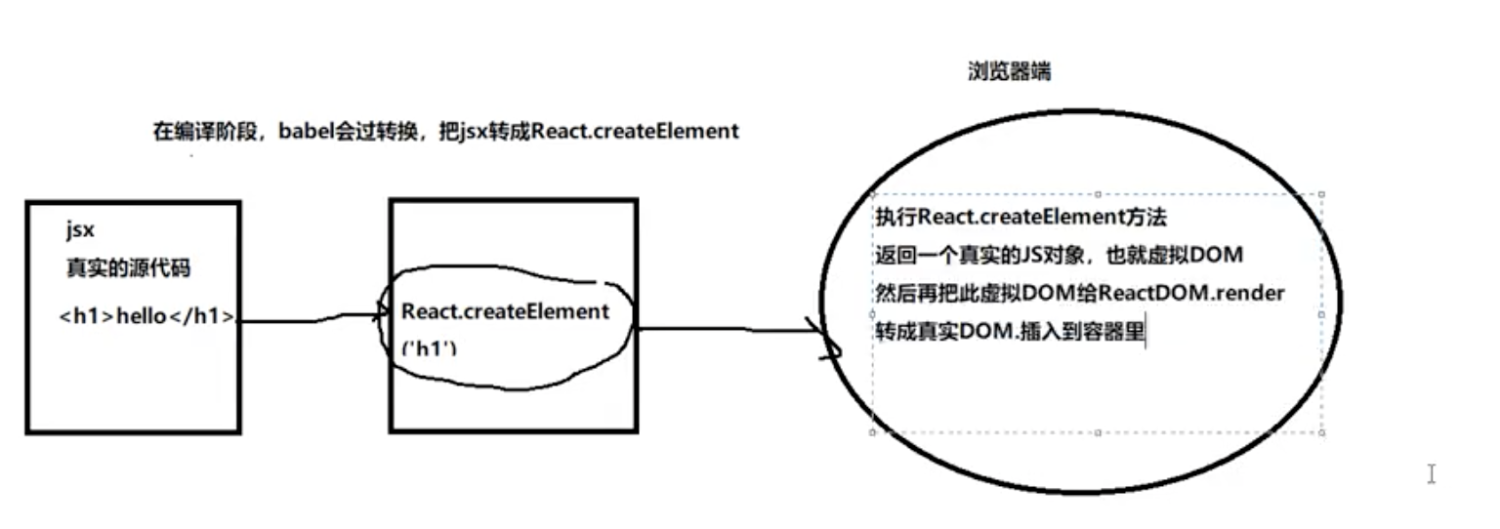
- JSX 其实只是一种语法糖,最终会通过 babeljs 转译成 createElement 语法,以下代码等价
为什么 React 选择了 JSX
- React 认为渲染逻辑本质上与其他 UI 逻辑存在内在耦合
- 比如 UI 需要绑定事件(button、a 原生等等);
- 比如 UI 中需要展示数据状态,在某些状态发生改变时,又需要改变 UI;
JSX 的书写规范
- JSX 的顶层只能有一个根元素,所以我们很多时候会在外层包裹一个 div 原生(或者使用后面我们学习的 Fragment);
- 为了方便阅读,我们通常在 jsx 的外层包裹一个小括号 (),这样可以方便阅读,并且 jsx 可以进行换行书写;
- JSX 中的标签可以是单标签,也可以是双标签; √ 注意:如果是单标签,必须以
/>结尾;
vscode 如何支持 JSX 语法「格式化、快捷提示。..」
- 创建的 js 文件,我们把后缀名设置为 jsx 即可,这样 js 文件中就可以支持 JSX 语法了
- webpack 打包的规则中,也是会对。jsx 这种文件,按照 JS 的方式进行处理的
在 ReactDOM.createRoot() 的时候
不能直接把 HTML/BODY 做为根容器,需要指定一个额外的盒子「例如:#root」
每一个构建的视图,只能有一个“根节点”
- 出现多个根节点则报错 Adjacent JSX elements must be wrapped in an enclosing tag.
- React 给我们提供了一个特殊的节点(标签):React.Fragment 空文档标记标签
html
<></>
1
既保证了可以只有一个根节点,又不新增一个 HTML 层级结构!!
jsx 中的注释
jsx
{/* 我是一段注释 */}
1
JSX 嵌入变量
情况一
当变量是 Number、String、Array 类型时,可以直接显示
除数组对象外,其余对象一般都不支持在{}中进行渲染,但是也有特殊情况:
- JSX 虚拟 DOM 对象
- 给元素设置 style 行内样式,要求必须写成一个对象格式
- 数组对象:把数组的每一项都分别拿出来渲染「并不是变为字符串渲染,中间没有逗号」
- 函数对象:不支持在{}中渲染,但是可以作为函数组件,用方式渲染!!
情况二
当变量是 null、undefined、Boolean 类型时,内容为空; - 如果希望可以显示 null、undefined、Boolean,那么需要转成字符串;
- 转换的方式有很多,比如 toString 方法、和空字符串拼接,String(变量)等方式;
情况三:
对象类型不能作为子元素(not valid as a React child)
给元素设置样式
- 行内样式:需要基于对象的格式处理,直接写样式字符串会报错
jsx
<h2 style={{
    color: 'red',
    fontSize: '18px' //样式属性要基于驼峰命名法处理
}}>
1
2
3
4
2
3
4
- 设置样式类名:需要把 class 替换为 className
jsx
<h2 className="box">
1
JSX 嵌入表达式
- 运算表达式
jsx
<h2>{ firstname + " " + lastname }</h2>
1
- 三元运算符
jsx
<h2>{ isLogin ? "是~": "否~" }</h2>
1
- 执行一个函数
jsx
<h2>{this.getFullName()}</h2>
1
jsx 绑定属性
- 元素都会有 title 属性
- img 元素会有 src 属性
- a 元素会有 href 属性
- 元素可能需要绑定 class
- 原生使用内联样式 style
React 事件绑定
如果原生 DOM 原生有一个监听事件,我们可以如何操作呢?
- 方式一:获取 DOM 原生,添加监听事件;
javascriptvar btn = document.getElementById('btn') btn.addEventListener('click', myClick)1
2- 方式二:在 HTML 原生中,直接绑定 onclick;
html<button onclick="myClick()" <script> function myClick() { console.log('你终于点中了我...') } </script>1
2
3
4
5
6javascriptvar btn = document.getElementById('btn') // DOM对象的事件属性 btn.onclick = myClick; function myClick() { console.log('你终于点中了我...') }1
2
3
4
5
6
在 React 中是如何操作呢?
- 我们来实现一下 React 中的事件监听,这里主要有两点不同
- √ React 事件的命名采用小驼峰式(camelCase),而不是纯小写;
- 我们需要通过{}传入一个事件处理函数,这个函数会在事件发生时被执行;
- 你不能通过返回 false 的方式阻止默认行为。你必须显式的使用 preventDefault
jsx
class App extends React.Component{
    constructor (props){
        super(props);
        this.state={
            counter: 0
        }
    }
    render(){
        return (
            <div>
                <h2>当前计数:{this.state.counter }</h2>
                <button onClick={this.increment.bind(this)}>+1</button>
                <button onClick={this.decrement.bind(this)}>-1</button>
            </div>
        )
    }
    increment(e){
        e.preventDefault();
        this.setState({
            counter:this.state.counter+1
        })
    }
    decrement(){
        this.setState({
            counter:this.state.counter-1
        })
    }
}

ReactDoM.render(<App/>,document.getElementById( "app")):
1
2
3
4
5
6
7
8
9
10
11
12
13
14
15
16
17
18
19
20
21
22
23
24
25
26
27
28
29
30
2
3
4
5
6
7
8
9
10
11
12
13
14
15
16
17
18
19
20
21
22
23
24
25
26
27
28
29
30
this 的绑定问题
- 方案一:bind 给 btnClick 显示绑定 this
jsx
class App extends React.Component {
    constructor(props) {
        super(props);
        this.state = {}
        this.btnClick = this.btnClick.bind(this);
    }
    render() {
        return (<button onClick={this.btnClick}>按钮1</button>)
    }
}
1
2
3
4
5
6
7
8
9
10
2
3
4
5
6
7
8
9
10
- 方案二:使用 ES6 class fields 语法
jsx
class App extends React.Component {
    constructor(props) {
        super(props);
        this.state = {}
        this.btnClick = this.btnClick.bind(this);
    }
    render() {
        return (<button onClick={this.btnClick}>按钮1</button>)
    }

    increment = () => {
      console.log(this.state.counter);
    }
}
1
2
3
4
5
6
7
8
9
10
11
12
13
14
2
3
4
5
6
7
8
9
10
11
12
13
14
- 方案三:事件监听时传入箭头函数(推荐)
jsx
class App extends React.Component {
    constructor(props) {
        super(props);
        this.state = {}
        this.btnClick = this.btnClick.bind(this);
    }
    render() {
        return (<button onClick={() => { this.increment() }}>按钮1</button>)
    }
}
1
2
3
4
5
6
7
8
9
10
2
3
4
5
6
7
8
9
10
事件参数传递
在执行事件函数时,有可能我们需要获取一些参数信息:比如 event 对象、其他参数
情况一:获取 event 对象
- 很多时候我们需要拿到 event 对象来做一些事情(比如阻止默认行为)
- 假如我们用不到 this,那么直接传入函数就可以获取到 event 对象;
情况二:获取更多参数
- 有更多参数时,我们最好的方式就是传入一个箭头函数,主动执行的事件函数,并且传入相关的其他参数;
jsx
class App extends React.Component {
    constructor(props) {
        super(props);
        this.state = {}
        this.btnClick = this.btnClick.bind(this);
    }
    render() {
        return (
            <>
                <button onClick={this.btnClick}>按钮1</button>
                <button onClick={e => { this.liClick({}, 1, e)}}>按钮2</button>
            </>
        )
    }

    btnClick(event) {
        console.log("按钮发生了点击", event);
    }

    // 获取更多
    liClick(item, index, event) {
        console.log("li发生了点击", item, index, event);
    }
}
1
2
3
4
5
6
7
8
9
10
11
12
13
14
15
16
17
18
19
20
21
22
23
24
2
3
4
5
6
7
8
9
10
11
12
13
14
15
16
17
18
19
20
21
22
23
24
条件渲染
- 真实开发中我们会从服务器请求到大量的数据,数据会以列表的形式存储
- 例如 商品、购物车等等的列表
- 在数据结构中,就是 Array 类型
如何展示列表呢?
- 在 React 中,展示列表最多的方式就是使用数组的 map 高阶函数;
- 还可以通过 filter、slice 对数组
jsx
class App extends React.Component {
    constructor(props) {
    super(props);
        this.state = {
            movies: ["大话西游", "海王", "流浪地球", "盗梦空间"]
        }
    }

    render() {
        return (
            <ul>
                {
                    this.state.movies.map((item, index, arr) => {
                        return (
                            <li className="item" title="li">
                                {item}
                            </li>
                        )
                    })
                }
            </ul>
        )
    }
}
1
2
3
4
5
6
7
8
9
10
11
12
13
14
15
16
17
18
19
20
21
22
23
24
2
3
4
5
6
7
8
9
10
11
12
13
14
15
16
17
18
19
20
21
22
23
24
列表中的 key
Warning: Each child in List should have a unique "key" prop.
- 这个警告是告诉我们需要在列表展示的 jsx 中添加一个 key。
- 至于如何添加一个 key,为什么要添加一个 key?(后面探讨)
虚拟 DOM
虚拟 DOM 的创建过程
index.js
javascript
import React from './react';
import ReactDOM from './react-dom';
//let element = <h1 className="title" style={{color:'red',fontSize:'24px'}}></h1>
//let element = React.createElement('h1',{className:'title',style:{color:'red',fontSize:'50px'}},'hello');
//console.log(JSON.stringify(element));
//function Welcome(props){
//    return React.createElement('h1',{className:'title'},props.title);
//}
class Welcome extends React.Component{
    render(){
        return React.createElement('h1',{className:'title'},this.props.title);
    }
}
let element = React.createElement(Welcome,{title:'标题'});
ReactDOM.render(element, document.getElementById('root'));
1
2
3
4
5
6
7
8
9
10
11
12
13
14
15
2
3
4
5
6
7
8
9
10
11
12
13
14
15
element.js
javascript
const ReactElement = function(type,props) {
    const element = {
        type: type,
        props: props,
    };
    return element;
}
function createElement(type,config,children){
  let propName;
  const props = {};
  for (propName in config) {
    props[propName] = config[propName];
  }
  const childrenLength = arguments.length - 2;
  if (childrenLength === 1) {
    props.children = children;
  } else if (childrenLength > 1) {
    props.children = Array.prototype.slice.call(arguments,2);
  }
  return ReactElement(type,props);
}
export default createElement;
1
2
3
4
5
6
7
8
9
10
11
12
13
14
15
16
17
18
19
20
21
22
2
3
4
5
6
7
8
9
10
11
12
13
14
15
16
17
18
19
20
21
22
react.js
javascript
import createElement from './element';
class Component{
    static isReactComponent = true
    constructor(props){
      this.props = props;
    }
  }
export default {
    createElement,Component
}
1
2
3
4
5
6
7
8
9
10
2
3
4
5
6
7
8
9
10
react-dom.js
javascript
function render(element,container){
    if(typeof element == 'string'){
      return container.appendChild(document.createTextNode(element))
    }
    let type,props;
    type = element.type;
    props = element.props;
    // 如果为true说明它是一个类组件
    if(type.isReactComponent){
      element = new type(props).render();
      type = element.type;
      props = element.props;
    }else if(typeof type =='function'){
      element = type(props);
      type = element.type;
      props = element.props;
    }
    let domElement = document.createElement(type);
    for(let propName in props){
        if(propName === 'children'){
          let children = props[propName];
          children = Array.isArray(children)?children:[children];
          children.forEach(child=>render(child,domElement));
        }else if(propName === 'className'){
          domElement.className = props[propName];
        }else if(propName === 'style'){
          let styleObj = props[propName];
          /**
          for(let attr in styleObj){
              domElement.style[attr] =  styleObj[attr];
          }
           */
          let cssText = Object.keys(styleObj).map(attr=>{
            return `${attr.replace(/([A-Z])/g,function(){ return"-"+arguments[1]})}:${styleObj[attr]}`;
          }).join(';');
          domElement.style.cssText = cssText;
        }else{
          domElement.setAttribute(propName,props[propName]);
        }
    }
    container.appendChild(domElement);
  }
export default {render};
1
2
3
4
5
6
7
8
9
10
11
12
13
14
15
16
17
18
19
20
21
22
23
24
25
26
27
28
29
30
31
32
33
34
35
36
37
38
39
40
41
42
43
2
3
4
5
6
7
8
9
10
11
12
13
14
15
16
17
18
19
20
21
22
23
24
25
26
27
28
29
30
31
32
33
34
35
36
37
38
39
40
41
42
43
为什么使用虚拟 DOM
为什么要采用虚拟 DOM,而不是直接修改真实的 DOM 呢?
- 很难跟踪状态发生的改变:原有的开发模式,我们很难跟踪到状态发生的改变,不方便针对我们应用程序进行调试;
- 操作真实 DOM 性能较低:传统的开发模式会进行频繁的 DOM 操作,而这一的做法性能非常的低;