Appearance
生命周期
生命周期
- 很多的事物都有从创建到销毁的整个过程,这个过程称之为是生命周期;
- React 组件也有自己的生命周期,了解组件的生命周期可以让我们在最合适的地方完成自己想要的功能;
- 生命周期和生命周期函数的关系:
- 生命周期是一个抽象的概念,在生命周期的整个过程,分成了很多个阶段;
- 比如装载阶段(Mount),组件第一次在 DOM 树中被渲染的过程;
- 比如更新过程(Update),组件状态发生变化,重新更新渲染的过程;
- 比如卸载过程(Unmount),组件从 DOM 树中被移除的过程;
- React 内部为了告诉我们当前处于哪些阶段,会对我们组件内部实现的某些函数进行回调,这些函数就是生命周期函数:
- 比如实现 componentDidMount 函数:组件已经挂载到 DOM 上时,就会回调;
- 比如实现 componentDidUpdate 函数:组件已经发生了更新时,就会回调;
- 比如实现 componentWillUnmount 函数:组件即将被移除时,就会回调;
- 我们可以在这些回调函数中编写自己的逻辑代码,来完成自己的需求功能;
- 我们谈 React 生命周期时,主要谈的类的生命周期,因为函数式组件是没有生命周期函数的;(后面我们可以通过 hooks 来模拟一些生命周期的回调)
生命周期解析
React V16.3 之前的生命周期
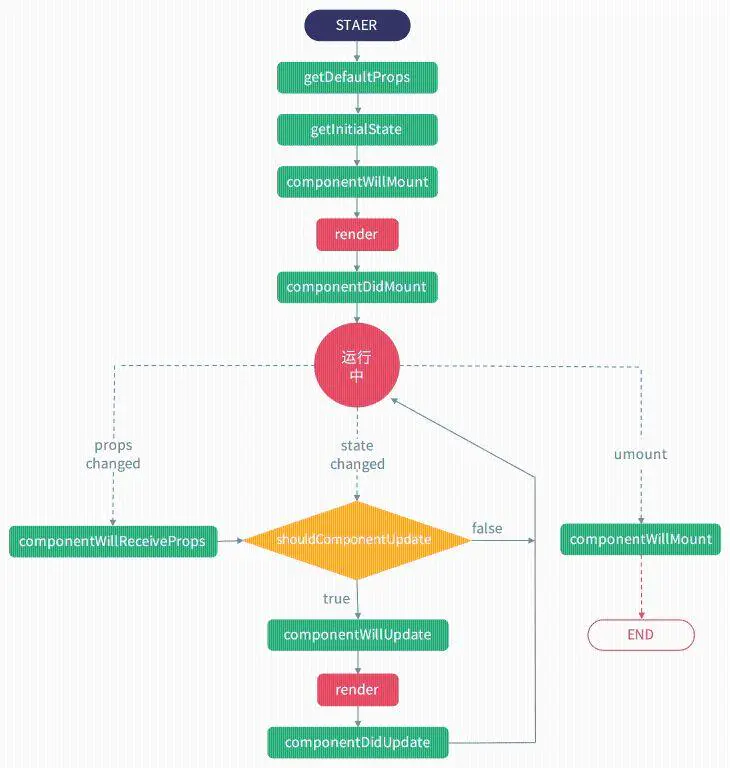
实例化
| 周期名称 | 解释 |
|---|---|
| getDefaultProps | 获取初始的 props |
| getInitialState | 获取初始的 state |
| componentWillMount | 组件渲染前的周期函数 |
| render | 渲染的函数,改变 dom |
| componentDidMount | 实例化完成后的更新 |
实例化完成后的存在期
| 周期名称 | 解释 |
|---|---|
| componentWillReceiveProps | props 发生改变使用的,我们有时候会在这个函数里做些判断然后去渲染 dom |
| shouldComponentUpdate | 字面意思,是否应该更新组件,默认返回 true。当返回 false 时,后期函数就不会调用,组件不会在次渲染。说白了就是不会进入 render |
| componentWillUpdate | props 或者 state 导致组件更新重新渲染就会调用,一般很少用到 |
| render | 再次进入 render 渲染 |
| componentDidUpdate | dom 更新完成后调用 |
离开组件销毁
componentWillUnmount | 通过路由离开发生的钩子
jsx
import React, { Component } from "react";
export default class Lifecycle extends Component {
  constructor(props) {
    super(props);
    // 常用于初始化状态
    console.log("1.组件构造函数执行");
  }

  //获取初始props
  static defaultProps = {
    msg:'omg'
  }

  //初始props的type
  static propTypes = {
		msg: PropTypes.string // 设置数据类型,必填
  }

  componentWillMount() { // ❌废弃
    // 此时可以访问状态和属性,可进行api调用等
    console.log("2.组件将要挂载");
  }

  componentDidMount() {
    // 组件已挂载,可进行状态更新操作
    console.log("3.组件已经渲染完毕");
  }

  //props或者state改变
  componentWillReceiveProps() { // ❌废弃
    // 父组件传递的属性变化,做相应响应
    console.log("4.将要接收属性传递");
  }

  //是否渲染
  shouldComponentUpdate() {
    // 组件是否需要更新,需要返回布尔值结果,优化点
    console.log("组件是否需要更新?");
  }

	//更新前
  componentWillUpdate(){ // ❌废弃
  }

  //更新后
  componentDidUpdate(){
  }

  //卸载组件
  componentWillUnmount(){
  }

  render() {
    console.log("组件渲染");
    return <div>生命周期探究</div>;
  }
}
1
2
3
4
5
6
7
8
9
10
11
12
13
14
15
16
17
18
19
20
21
22
23
24
25
26
27
28
29
30
31
32
33
34
35
36
37
38
39
40
41
42
43
44
45
46
47
48
49
50
51
52
53
54
55
56
57
2
3
4
5
6
7
8
9
10
11
12
13
14
15
16
17
18
19
20
21
22
23
24
25
26
27
28
29
30
31
32
33
34
35
36
37
38
39
40
41
42
43
44
45
46
47
48
49
50
51
52
53
54
55
56
57
新版生命周期
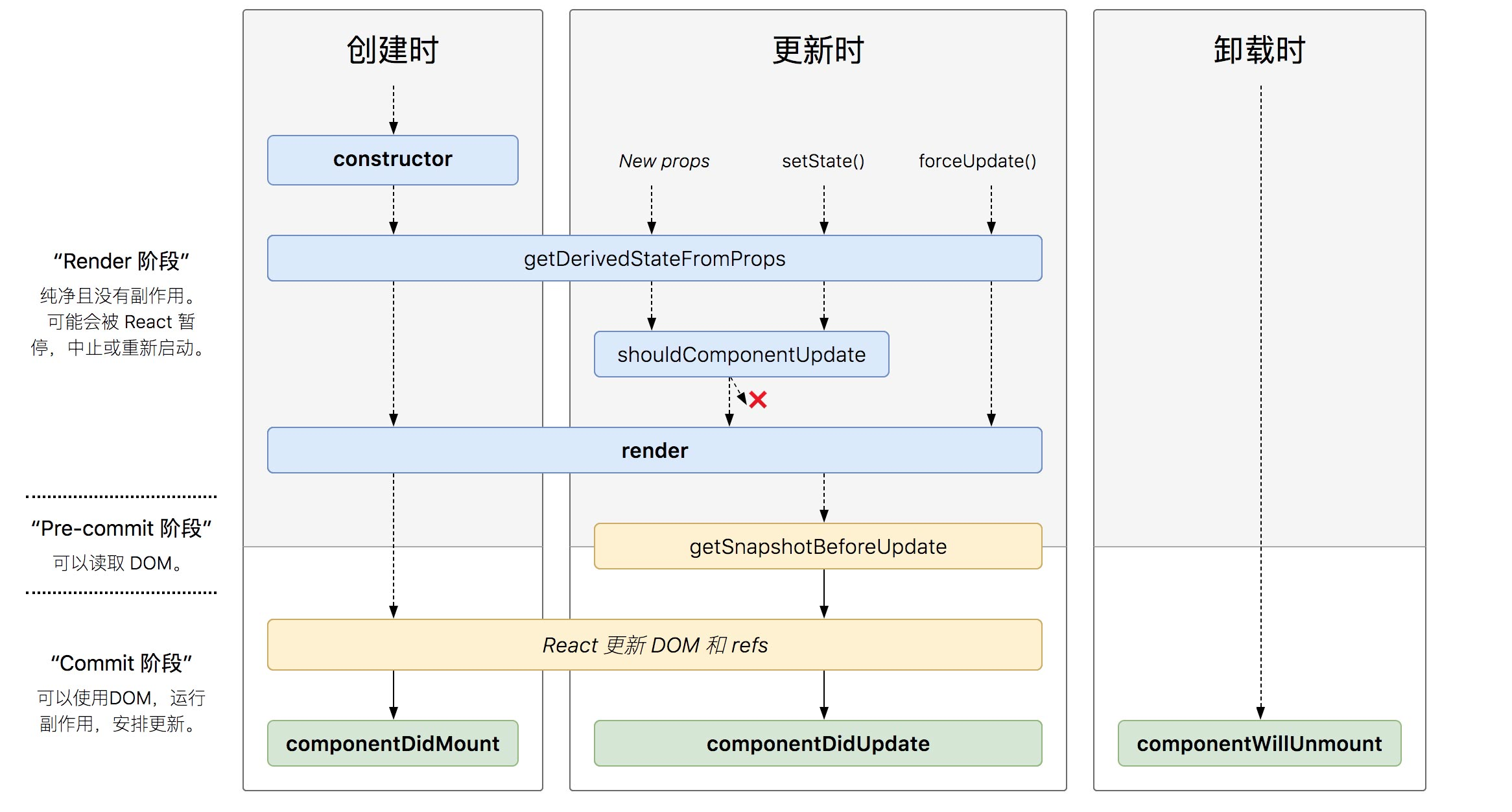 V17 可能会废弃的三个⽣生命周期函数⽤用 getDerivedStateFromProps 替代,⽬目前使⽤用的话加上 UNSAFE_:
- componentWillMount
- componentWillReceiveProps
- componentWillUpdate
引入两个新的生命周期
static getDerivedStateFromProps
- static getDerivedStateFromProps(props, state) 这个生命周期的功能实际上就是将传入的 props 映射到 state 上面
jsx
import React from 'react';
import ReactDOM from 'react-dom';
class Counter extends React.Component{
    static defaultProps = {
      name:'珠峰架构'
    };
    constructor(props){
      super();
      this.state = {number:0}
    }

    handleClick=()=>{
      this.setState({number:this.state.number+1});
    };

    render(){
      console.log('3.render');
      return (
        <div>
          <p>{this.state.number}</p>
          <ChildCounter number={this.state.number}/>
          <button onClick={this.handleClick}>+</button>
        </div>
      )
    }
  }
  class ChildCounter extends React.Component{
      constructor(){
          super();
          this.state = {number:0};
      }
    static getDerivedStateFromProps(nextProps, prevState) {
        const {number} = nextProps;
        // 当传入的type发生变化的时候,更新state
        if (number%2==0) {
            return { number:number*2};
        }else{
            return { number:number*3};
        }
        // 否则,对于state不进行任何操作
        return null;
    }
    render(){
      console.log('child-render',this.state)
      return (<div>
        {this.state.number}
      </div>)
    }

  }

ReactDOM.render(
    <Counter />,
    document.getElementById('root')
);
1
2
3
4
5
6
7
8
9
10
11
12
13
14
15
16
17
18
19
20
21
22
23
24
25
26
27
28
29
30
31
32
33
34
35
36
37
38
39
40
41
42
43
44
45
46
47
48
49
50
51
52
53
54
55
2
3
4
5
6
7
8
9
10
11
12
13
14
15
16
17
18
19
20
21
22
23
24
25
26
27
28
29
30
31
32
33
34
35
36
37
38
39
40
41
42
43
44
45
46
47
48
49
50
51
52
53
54
55
getSnapshotBeforeUpdate
- getSnapshotBeforeUpdate() 被调用于 render 之后,可以读取但无法使用 DOM 的时候。它使您的组件可以在可能更改之前从 DOM 捕获一些信息(例如滚动位置)。此生命周期返回的任何值都将作为参数传递给 componentDidUpdate()
jsx
import React from 'react';
import ReactDOM from 'react-dom';
class ScrollingList extends React.Component {
    constructor(props) {
        super(props);
        this.state = {messages: []}
        this.wrapper = React.createRef();
    }

    addMessage() {
        this.setState(state => ({
            messages: [`${state.messages.length}`, ...state.messages],
        }))
    }
    componentDidMount() {
        this.timeID = window.setInterval(() => {//设置定时器
            this.addMessage();
        }, 1000)
    }
    componentWillUnmount() {//清除定时器
        window.clearInterval(this.timeID);
    }
    getSnapshotBeforeUpdate() {//很关键的,我们获取当前rootNode的scrollHeight,传到componentDidUpdate 的参数perScrollHeight
        return this.wrapper.current.scrollHeight;
    }
    componentDidUpdate(perProps, perState, prevScrollHeight) {
        const curScrollTop = this.wrapper.current.scrollTop;//当前向上卷去的高度
        //当前向上卷去的高度加上增加的内容高度
        this.wrapper.current.scrollTop = curScrollTop + (this.wrapper.current.scrollHeight - prevScrollHeight);
    }
    render() {
        let style = {
            height: '100px',
            width: '200px',
            border: '1px solid red',
            overflow: 'auto'
        }
        return (
            <div style={style} ref={this.wrapper} >
                {this.state.messages.map((message, index) => (
                    <div key={index}>{message} </div>
                ))}
            </div>
        );
    }
}

ReactDOM.render(
    <ScrollingList />,
    document.getElementById('root')
);
1
2
3
4
5
6
7
8
9
10
11
12
13
14
15
16
17
18
19
20
21
22
23
24
25
26
27
28
29
30
31
32
33
34
35
36
37
38
39
40
41
42
43
44
45
46
47
48
49
50
51
2
3
4
5
6
7
8
9
10
11
12
13
14
15
16
17
18
19
20
21
22
23
24
25
26
27
28
29
30
31
32
33
34
35
36
37
38
39
40
41
42
43
44
45
46
47
48
49
50
51