Appearance
router V5 的基础运用
bash
yarn add react-router-dom@5.3.4
1
(https://v5.reactrouter.com/web/guides/quick-start)[https://v5.reactrouter.com/web/guides/quick-start]
基础运用
1、<Link>等组件,需要放在Router(BrowserRouter/HashRouter)的内部!
2、每当页面加载或者路由切换的时候,都会去和每一个<Route>进行匹配 - 和其中一个匹配成功后,还会继续向下匹配,所以需要基于<Switch>处理 - 默认是“非精准”匹配的,所以我们需要基于exact处理
jsx
/* App.jsx */
import React from "react";
import { HashRouter, Route, Switch, Redirect, Link } from 'react-router-dom';
import A from './views/A';
import B from './views/B';
import C from './views/C';

const App = function App() {
    return <HashRouter>
        {/* 导航区域 */}
        <nav className="nav-box">
            <Link to="/">A</Link>
            <Link to="/b">B</Link>
            <Link to="/c">C</Link>
        </nav>

        {/* 内容区域 */}
        <div className="content">
            <Switch>
                <Route exact path="/" component={A} />
                <Route path="/b" component={B} />
                <Route path="/c" component={C} />
                {/* <Route component={404组件} /> */}
                <Redirect to="/" />
            </Switch>
        </div>
    </HashRouter>;
};

export default App;
1
2
3
4
5
6
7
8
9
10
11
12
13
14
15
16
17
18
19
20
21
22
23
24
25
26
27
28
29
30
2
3
4
5
6
7
8
9
10
11
12
13
14
15
16
17
18
19
20
21
22
23
24
25
26
27
28
29
30
在路由匹配成功后,可以基于component指定需要渲染的组件,也可以基于render指定一个函数,基于函数的返回值,动态控制渲染的内容!!
jsx
<Route path="/c" render={() => {
    if (1 === 1) {
        return <C />
    }
    return <Redirect to="/" />
}} />
1
2
3
4
5
6
2
3
4
5
6
二级路由
jsx
/* App.jsx */
const App = function App() {
  return <HashRouter>
      {/* 导航区域 */}
      <nav className="nav-box">
          <Link to="/a">A</Link>
          ...
      </nav>

      {/* 内容区域 */}
      <div className="content">
          <Switch>
              <Redirect exact from="/" to="/a" />
              <Route path="/a" component={A} />
              ...
          </Switch>
      </div>
  </HashRouter>;
}
1
2
3
4
5
6
7
8
9
10
11
12
13
14
15
16
17
18
19
2
3
4
5
6
7
8
9
10
11
12
13
14
15
16
17
18
19
jsx
/* A.jsx */
import React from "react";
import { Link, Route, Redirect, Switch } from 'react-router-dom';
import A1 from './a/A1';
import A2 from './a/A2';
import A3 from './a/A3';

// 处理样式
import styled from "styled-components";
const DemoBox = styled.div`
    display: flex;
    .menu{
        a{
          display:block;
        }
    }
`;

const A = function A() {
    // '/a/xxx' 中的 '/a' 不能省略!!
    return <DemoBox>
        <div className="menu">
            <Link to="/a/a1">A1</Link>
            <Link to="/a/a2">A2</Link>
            <Link to="/a/a3">A3</Link>
        </div>
        <div className="content">
            <Switch>
                <Redirect exact from="/a" to="/a/a1" />
                <Route path="/a/a1" component={A1} />
                <Route path="/a/a2" component={A2} />
                <Route path="/a/a3" component={A3} />
            </Switch>
        </div>
    </DemoBox>;
};
export default A;
1
2
3
4
5
6
7
8
9
10
11
12
13
14
15
16
17
18
19
20
21
22
23
24
25
26
27
28
29
30
31
32
33
34
35
36
37
2
3
4
5
6
7
8
9
10
11
12
13
14
15
16
17
18
19
20
21
22
23
24
25
26
27
28
29
30
31
32
33
34
35
36
37
构建路由表
router/index.jsx
jsx
import React from 'react';
import { Switch, Route, Redirect } from 'react-router-dom';

const RouterView = function RouterView(props) {
    let { routes } = props;
    return <Switch>
        {routes.map((route, index) => {
            let { redirect, from, to, exact, path, name, component: Component, meta } = route,
                props = {};
            if (redirect) {
                props = { to };
                if (from) props.from = from;
                if (exact) props.exact = true;
                return <Redirect key={index} {...props} />
            }
            props = { path };
            if (exact) props.exact = true;
            return <Route key={index} {...props} render={() => {
                // 做一些特殊的处理,例如:登录态检验、导航守卫等
                return <Component />;
            }} />;
        })}
    </Switch>;
};
export default RouterView;
1
2
3
4
5
6
7
8
9
10
11
12
13
14
15
16
17
18
19
20
21
22
23
24
25
2
3
4
5
6
7
8
9
10
11
12
13
14
15
16
17
18
19
20
21
22
23
24
25
router/routes.js
JavaScript
import A from '../views/A';
import B from '../views/B';
import C from '../views/C';

/*
一级路由
  重定向选项
    + redirect:true
    + from:从哪来
    + to:定向的地址
    + exact:精准匹配
  正常选项
    + path:匹配路径
    + name:路由名称
    + component:需要渲染的组件
    + meta:路由元信息
    + exact:精准匹配
*/
const routes = [{
    redirect: true,
    from: '/',
    to: '/a',
    exact: true
}, {
    path: '/a',
    name: 'a',
    component: A,
    meta: {}
}, {
    path: '/b',
    name: 'b',
    component: B,
    meta: {}
}, {
    path: '/c',
    name: 'c',
    component: C,
    meta: {}
}, {
    redirect: true,
    to: '/a'
}];
export default routes;
1
2
3
4
5
6
7
8
9
10
11
12
13
14
15
16
17
18
19
20
21
22
23
24
25
26
27
28
29
30
31
32
33
34
35
36
37
38
39
40
41
42
43
2
3
4
5
6
7
8
9
10
11
12
13
14
15
16
17
18
19
20
21
22
23
24
25
26
27
28
29
30
31
32
33
34
35
36
37
38
39
40
41
42
43
router/aRoutes.js
JavaScript
/* A组件的二级路由 */
import A1 from '../views/a/A1';
import A2 from '../views/a/A2';
import A3 from '../views/a/A3';

const aRoutes = [{
    redirect: true,
    from: '/a',
    to: '/a/a1',
    exact: true
}, {
    path: '/a/a1',
    name: 'a-a1',
    component: A1,
    meta: {}
}, {
    path: '/a/a2',
    name: 'a-a2',
    component: A2,
    meta: {}
}, {
    path: '/a/a3',
    name: 'a-a3',
    component: A3,
    meta: {}
}];
export default aRoutes;
1
2
3
4
5
6
7
8
9
10
11
12
13
14
15
16
17
18
19
20
21
22
23
24
25
26
27
2
3
4
5
6
7
8
9
10
11
12
13
14
15
16
17
18
19
20
21
22
23
24
25
26
27
App.jsx
jsx
import { HashRouter, Link } from 'react-router-dom';
import RouterView from "./router";
import routes from "./router/routes";
const App = function App() {
    return <HashRouter>
        ...
        <div className="content">
            <RouterView routes={routes} />
        </div>
    </HashRouter>;
};
export default App;
1
2
3
4
5
6
7
8
9
10
11
12
2
3
4
5
6
7
8
9
10
11
12
views/A.jsx
jsx
import { Link } from 'react-router-dom';
import RouterView from "../router";
import aRoutes from "../router/aRoutes";
...
const A = function A() {
    return <DemoBox>
        ...
        <div className="content">
            <RouterView routes={aRoutes} />
        </div>
    </DemoBox>;
};
export default A;
1
2
3
4
5
6
7
8
9
10
11
12
13
2
3
4
5
6
7
8
9
10
11
12
13
路由懒加载
RouterView.jsx
jsx
const RouterView = function RouterView(props) {
    ...
    return <Switch>
        {routes.map((route, index) => {
            ...
            return <Route key={index} {...props} render={() => {
                return <Suspense fallback={<>加载中...</>}>
                    <Component />
                </Suspense>;
            }} />;
        })}
    </Switch>;
};
export default RouterView;
1
2
3
4
5
6
7
8
9
10
11
12
13
14
2
3
4
5
6
7
8
9
10
11
12
13
14
路由表中
JavaScript
import { lazy } from 'react';
import A from '../views/A';

const routes = [
...
{
    ...
    component: A
}, {
    ...
    component: lazy(() => import('../views/B'))
}, {
    ...
    component: lazy(() => import('../views/C'))
}
...
];
export default routes;
1
2
3
4
5
6
7
8
9
10
11
12
13
14
15
16
17
18
2
3
4
5
6
7
8
9
10
11
12
13
14
15
16
17
18
受控组件和withRouter
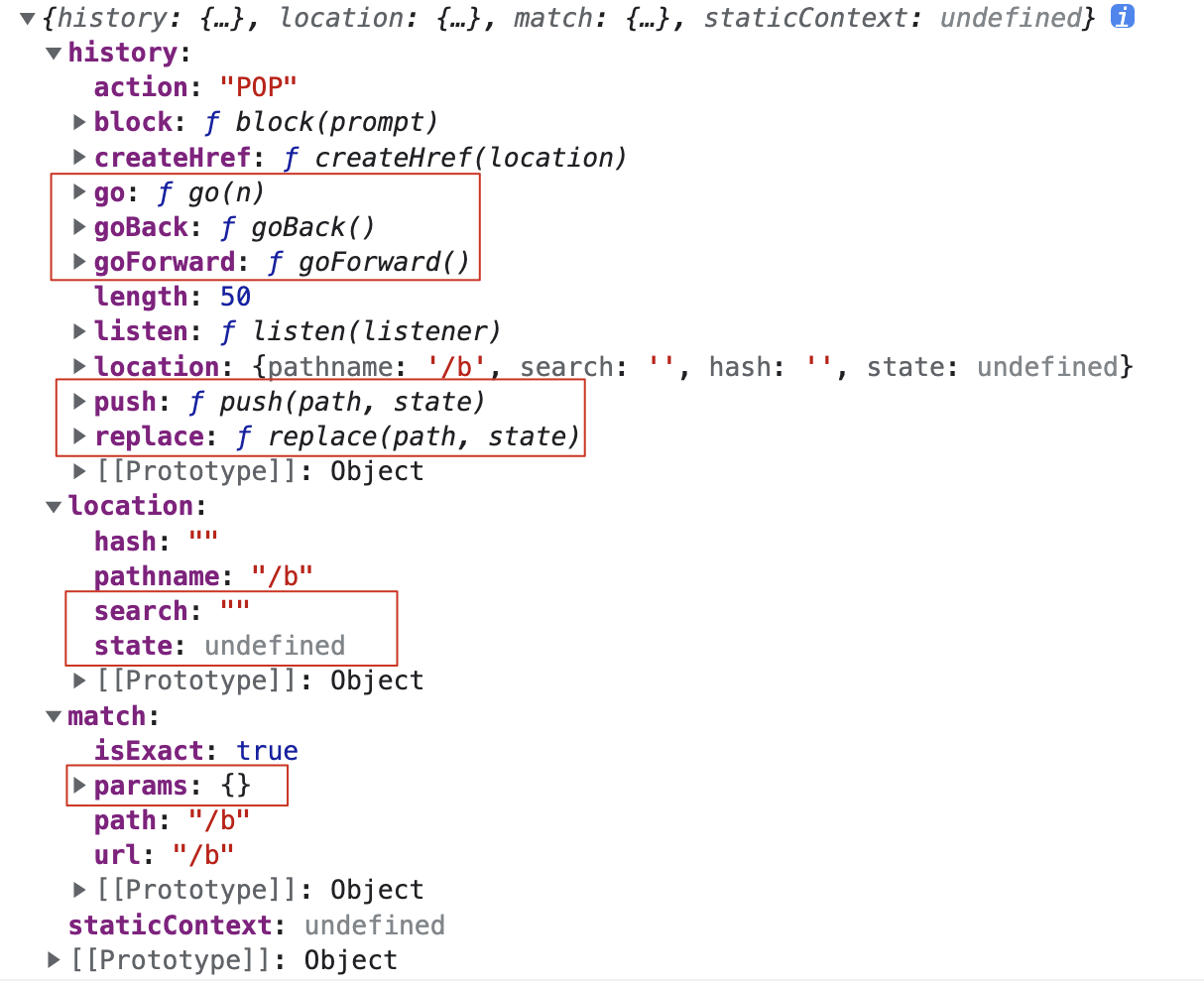
受控组件:基于Route路由渲染的组件
- history -> useHistory
- location -> useLocation
- match -> useRouteMatch
withRouter高阶函数的作用:让非受控组件具备受控组件的特征
JavaScript
/* RouterView */
const RouterView = function RouterView(props) {
    let { routes } = props;
    return <Switch>
        {routes.map((route, index) => {
            ...
            return <Route ... render={(props) => {
                return <Suspense ...>
                    <Component {...props} />
                </Suspense>;
            }} />;
        })}
    </Switch>;
};
export default RouterView;
1
2
3
4
5
6
7
8
9
10
11
12
13
14
15
2
3
4
5
6
7
8
9
10
11
12
13
14
15
components/HomeHead.jsx
jsx
import React from "react";
import { Link, withRouter } from 'react-router-dom';

// 样式
import styled from "styled-components";
const HomeHeadBox = styled.nav`
    a{
        margin-right: 10px;
    }
`;

const HomeHead = function HomeHead(props) {
    console.log(props);
    return <HomeHeadBox>
        <Link to="/a">A</Link>
        <Link to="/b">B</Link>
        <Link to="/c">C</Link>
    </HomeHeadBox>;
};
export default withRouter(HomeHead);
1
2
3
4
5
6
7
8
9
10
11
12
13
14
15
16
17
18
19
20
2
3
4
5
6
7
8
9
10
11
12
13
14
15
16
17
18
19
20
路由跳转方案
方案一:Link跳转
jsx
<Link to="/xxx">导航</Link>
<Link to={{
    pathname:'/xxx',
    search:'',
    state:{}
}}>导航</Link>
<Link to="/xxx" replace>导航</Link>
1
2
3
4
5
6
7
2
3
4
5
6
7
方案二:编程式导航
jsx
history.push('/c');
history.push({
    pathname: '/c',
    search: '',
    state: {}
});
history.replace('/c');
1
2
3
4
5
6
7
2
3
4
5
6
7
路由传参方案
方案一:问号传参
特点:最常用的方案之一;传递信息暴露到URL地址中,不安全而且有点丑,也有长度限制!!
jsx
// 传递
history.push({
    pathname: '/c',
    search: 'lx=0&name=zhufeng'
});

// 接收
import { useLocation } from 'react-router-dom';
let { search } = useLocation();
1
2
3
4
5
6
7
8
9
2
3
4
5
6
7
8
9
方案二:路径参数
特点:目前主流方案之一
JavaScript
// 路由表
{
    // :xxx 动态匹配规则
    // ? 可有可无
    path: '/c/:lx?/:name?',
    ....
}

// 传递
history.push(`/c/0/zhufeng`);

//接收
import { useRouteMatch } from 'react-router-dom';
let { params } = useRouteMatch();
1
2
3
4
5
6
7
8
9
10
11
12
13
14
2
3
4
5
6
7
8
9
10
11
12
13
14
方案三:隐式传参
特点:传递信息是隐式传递,不暴露在外面;页面刷新,传递的信息就消失了!!
JavaScript
// 传递
history.push({
    pathname: '/c',
    state: {
        lx: 0,
        name: 'zhufeng'
    }
})

// 接收
import { useLocation } from 'react-router-dom';
let { state } = useLocation();
1
2
3
4
5
6
7
8
9
10
11
12
2
3
4
5
6
7
8
9
10
11
12
Link和NavLink
NavLink和Link都可以实现路由跳转,只不过NavLink有自动匹配,并且设置选中样式「active」的特点!!
每一次路由切换完毕后「或者页面加载完」,都会拿当前路由地址,和NavLink中的to「或者to中的pathname进行比较」,给匹配的这一项A,设置active样式类!!
NavLink可与设置 exact 精准匹配属性
可以基于 activeClassName 属性设置选中的样式类名
jsx
// 结构
<NavLink to="/a">A</NavLink>
<NavLink to="/b">B</NavLink>
<NavLink to="/c">C</NavLink>

// 样式
const NavBox = styled.nav`
   a{
    margin-right: 10px;
    color: #000;
    &.active{
        color:red;
    }
   }
`;
1
2
3
4
5
6
7
8
9
10
11
12
13
14
15
2
3
4
5
6
7
8
9
10
11
12
13
14
15